Resources
Technical blog: the FinalAV Security framework
In this article we explain at a high level how FinalAV Security protects a computer system from malware. We compare it with the traditional approaches, identify their limitations, and elaborate on why our patented technology solves them.
Table of contents

1. The traditional anti-virus model and its limitations
The vast majority of anti-virus, and broadly endpoint security solutions nowadays, use two methods:
1.1 Signature-based Detection
The original approach already used by the very first commercial antivirus products in 1987, such as McAfee VirusScan, NOD (now ESET), Flushot Plus and G DATA Software’s AntiVirusKit. These systems literally maintain a “black list” of known virus or malware, and when an application is launched in your computer, they check its file signature and will block any that is in such “black list”.
To speed up the identification of applications at launch time and keep the “black lists” within a manageable size, they use file hashes rather than comparing the whole file content. A file hash is a unique, fixed-length alphanumeric string (a “digital fingerprint or signature”) generated by a cryptographic algorithm from a file’s binary content. Because even a one-bit change in the file changes the hash entirely, it acts as a definitive identifier.
An important consideration, is that the detection at launch is typically implemented at file level using a device driver. For instance, in the Microsoft Windows operating system, file system mini-filter drivers are used. When a user double-clicks on, say, the Microsoft Word icon on the Windows desktop to launch the word processing application, the process Explorer.exe which handles large parts of the user interface and file system will open the executable file C:\Program Files\Microsoft Office\root\Office16\WINWORD.EXE, create a process in memory by loading its contents into memory, along with all the required dynamic link libraries (DLLs), and trigger its execution. Anti-virus software solutions “hook” or insert themselves in the executable file opening stage, so they can check whether the file hash or “digital signature” of the launched application is on the malware “black list”, in which case it would abort the launch protecting the system.
1.2 Behavioural/heuristic detection
In recent years endpoint security solutions have added capabilities to identify suspicious code and/or behaviour, to cover situations when the signature-based approach has failed. Heuristic analysis looks for suspicious code structures or commands that look similar to known threats, even if an exact signature is not found. Behaviour monitoring watches what a program actually does (e.g., if a file suddenly starts encrypting hundreds of documents or trying to disable system logs), in which case the antivirus steps in to kill the process.
The complexity of behavioural detection is that very often a specific activity or function cannot be unequivocally flagged as malicious. If the rules and thresholds are set too tight, false positives will emerge, whereas if they are set too loose, false negatives will. As result, these solutions have to be often combined with human support, such as using a security operations centre (SOC) service, which will have 24×7 IT professionals at hand to review the alerts and determine if they are legitimate or not.
1.3 Current limitations
As already hinted, these approaches have multiple limitations, which hackers have exploited over the years, particularly as cybercrime has professionalised and has significant resources at its disposal:
- Scale: according to the independent IT security institute AV-Test, at the end of 2025 there were 995 million identified active malware samples. Given that the signature-based detection approach is reactive by design, that is, a new malware will be added to the “black list” after it has been released in the wild and detected or infected someone, it is clear the cybersecurity industry cannot keep up with such approach.
- Polymorphism: polymorphic virus is a type of “shape-shifting” malware that constantly changes its identifiable code or signature with each new infection while keeping its core malicious purpose the same. This behaviour renders the signature-based detection approach largely ineffective.
- Process injections: malware often spreads by replacing dynamic link libraries (DLLs) that are part of the operating system, and get loaded into a process memory space when a new application is launched. Again, this renders the signature-based detection approach ineffective, because the main executable file has not been infected. In the prior example, a malware would not touch file WINWORD.EXE but replace a required DLL, like MSO.DLL, a component of the Microsoft Office product. An antivirus relying on signature-based detection will greenlight WINWORD.EXE for safe launch, but unfortunately as it loads MSO.DLL during process creation, the hacker’s malicious code will be able to run. Likewise, an antivirus relying on whitelists of applications (a.k.a. allowlists) will greenlight WINWORD.EXE for safe launch, and not prevent the loading of a hacked DLL. An alternative approach hackers use is to inject DLLs into already running processes “on the fly”, which have already been greenlighted for execution. Again, this renders the signature-based detection approach ineffective.
- False positives: when legitimate activities are incorrectly flagged as threats by behavioural rules, we call it a “false positive”. They lead to “alert fatigue” and unnecessary disruptions for users, and in practice need human support via a SOC service.
- False negatives: when actual malicious attacks go undetected typically because the malicious behaviour falls under the behavioural rules’ thresholds, we call it a “false negative”. They leave the system vulnerable to security breaches. It is also important to understand that hackers can test their malware creations against the publicly available anti-virus solutions, so it is very easy for them to adjust their malware behaviour to be able to “fly under the radar” of these behavioural rules.
2. The FinalAV Security framework
Our team set up to find a way to overcome the above limitations of the existing anti-virus technologies. In our view this required a complete redesign of the security framework, rather than adding another layer of checks.
We went back to the drawing board and started from the basics: what defines malware? We identified replication / persistency, host attachment / process injection, data retrieval, anonymity and encryption/polymorphism as key functionalities. Unfortunately, these key activities that a “virus” needs to perform to be effective, are not unequivocally malicious. For instance, an application like Microsoft Visual Studio legitimately creates executable files, a browser sends data out of your computer to webservers, and many software utilities will legitimately “attach” to other processes to extend their functionality.
As such, a completely new security framework was needed if a preventive rather than reactive security solution was the objective. If we define the software universe as a set, it can be argued it contains several sub-sets such as legitimate software, malware and quasi-malware (e.g., spyware is annoying but is generally part of a functioning product).
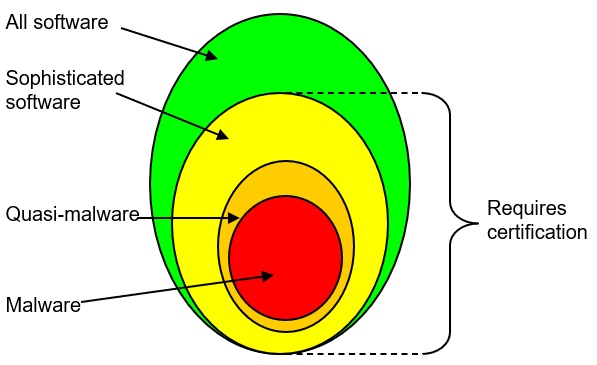
What we did is define a new sub-set we called Sophisticated software, as software that needs to perform those functions we identified earlier which a virus needs to be able to perform to be effective, such as replication / persistency, host attachment / process injection, data retrieval, anonymity and encryption/polymorphism. All malware belongs to the Sophisticated software set, but not all members of the Sophisticated software set belong to the Malware set.
Many applications in a computer do not need to perform such functions and do not belong to the Sophisticated software set, such a Microsoft Office, Adobe Reader or most accounting software. On the other hand, Internet browsers do belong, as do development tools and many system utilities.
As noted, while those “sophisticated functions” are necessary for any virus to be effective, they are also performed as well by some legitimate software, thus it is not sufficient to detect a virus.

So, we cannot treat Sophisticated software as Malware a priori, yet we can apply zero-trust principles to it putting it in a real-time sandbox to limit its ability to perform such “sophisticated functions” unless the software carries verifiable digital signature. Most importantly, the set of Sophisticated software is much smaller, and within it, the sub-set of non-digitally signed even less, which makes it manageable. Nowadays the vast majority of software companies do digitally sign their products.
To summarise, the FinalAV Security framework’s key principle is that “the security software only needs to enforce policies to ensure that software that is capable of virus behaviour is certified by the developer, otherwise it is sandboxed and not allowed to behave like a virus”. The diagram below shows how our security framework compares to the traditional model:
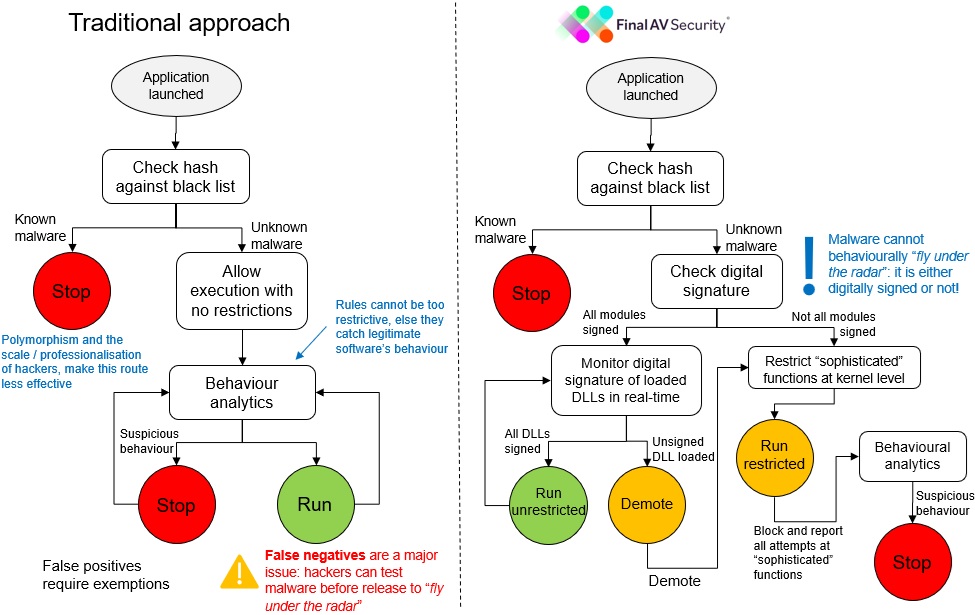
Needless to say, that hackers do not digitally sign their malware, and so, under the FinalAV Security framework, malware will always fall through the ‘run restricted’ path. Malware does not need to be in any “black list” to be blocked as in the traditional approach.
3. How is this new security framework implemented?
Developing the FinalAV Security platform to implement this new security framework required us to do things in a significantly different way from the mainstream anti-virus solutions. The key elements include:
3.1 Monitoring at process rather than file level
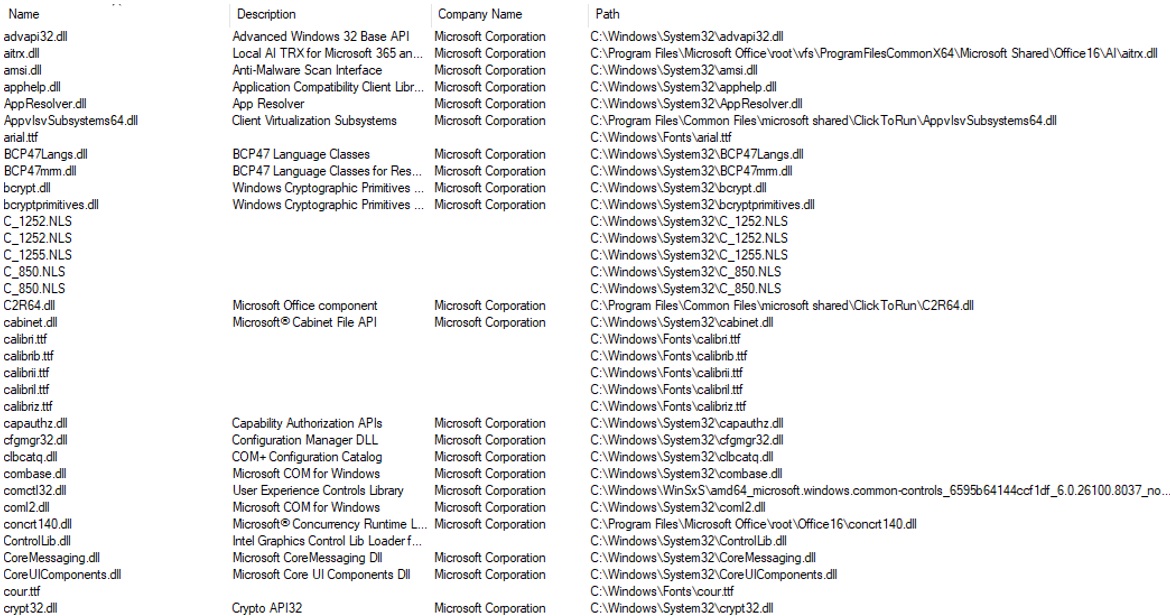
Rather than using a file system mini-filter device driver to check on the executable file being launched, we use a mini-filter device driver to monitor every single loading and unloading of a module into a process memory. In our earlier example with the launch of Microsoft Word, this means we are not only checking the main executable file, WINWORD.EXE, but also the other 50-100 dynamic link libraries and other data files loaded into the process memory space. Here is an example of the various modules being loaded by Microsoft Word.
3.2 Verification of each module’s digital signature
For each module (both the main executable and all the dynamic link libraries) loaded into a process memory space, FinalAV Security verifies the digital signature which legally identifies the developer of the file. Here is an example of the digital signature of the commonly loaded module gdi32.dll (Windows Graphics Device Interface Client DLL), which is a critical Microsoft Windows component responsible for rendering 2D graphical objects, managing fonts, and handling output to screens and printers. Any application that has a user interface will load this module at start up time.
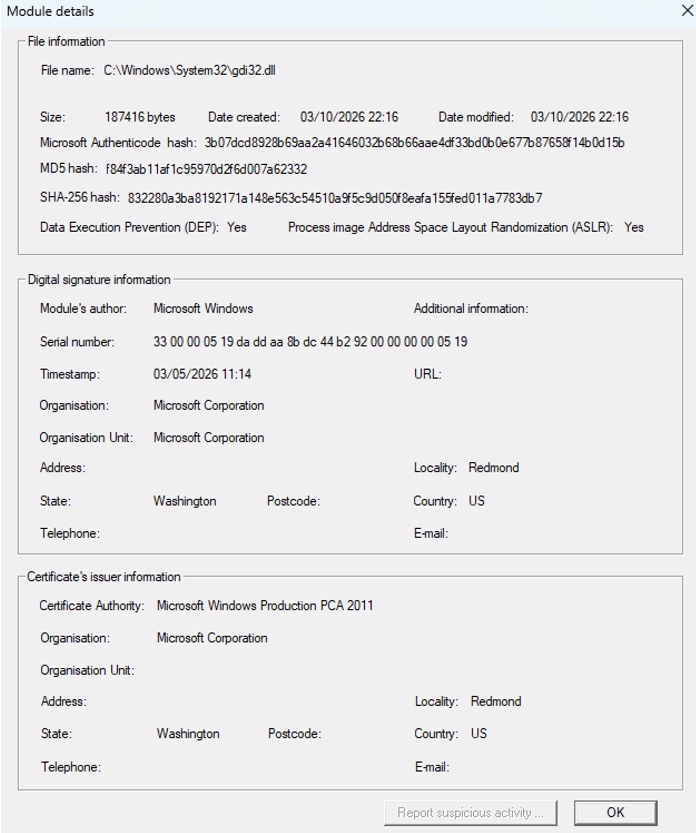
If all the modules in the process memory space of a launched application are digitally signed, it will be allowed to run unrestricted, otherwise FinalAV Security will limit its ability to perform the aforementioned “sophisticated functions” typical of virus behaviour. If/when a non-digitally signed module is loaded into the process memory space, that process will be “demoted” and from then on run in “restricted mode”.
3.3 Verification of ASLR and DEP enablement
FinalAV Security verifies that for each module (both the main executable and all the dynamic link libraries) address space layout randomization (ASLR) has been enabled. Further, it also checks that for each process data execution prevention (DEP) has been enabled. If that is not the case, the process will not be trusted.
Address space layout randomization (ASLR) is a computer security technique involved in preventing exploitation of memory corruption vulnerabilities. In order to prevent an attacker from reliably jumping to, for example, a particular exploited function in memory, ASLR randomly arranges the address space positions of key data areas of a module, including the base of the executable and the positions of the stack, heap and libraries.
Data execution prevention (DEP) is a security feature that marks memory areas as non-executable, preventing malicious code from running in protected memory regions like stacks or heaps. It helps prevent buffer overflow attacks and enhances system security, usually enabled by default for Windows components.
Unfortunately, not all software is released with these features enabled yet despite the vast majority of development platforms supporting them, and therefore can be exploited by hackers.
3.4 Real-time sandboxing
All processes run in a real-time sandbox which controls access to all the kernel functions associated with those “sophisticated functions”. As long as all modules in the process memory space are digitally signed, access to all kernel functions is unrestricted. Conversely, if one or many modules are not digitally signed, such kernel function calls will fail.
It is important to note that this means non-digitally signed applications will still be able to run, although on restricted mode, and will be unable to, say, create copies of themselves, modify operating system settings, or send data from your computer to a remote server. For instance, if a user installs a free game from the internet which carries spyware and possibly malware payload, it will still be able to play the game, but any attempt by the game to “drop” its payload in the filesystem or to open a backdoor will be thwarted.
3.5 Logging and auditing
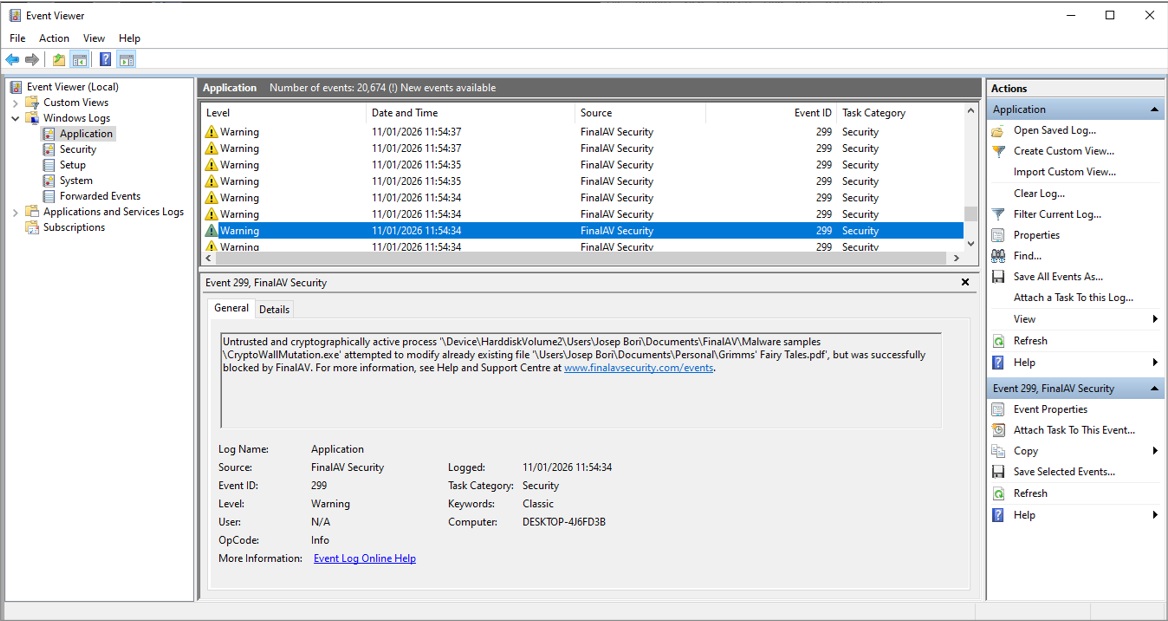
All potentially risky activity is recorded in the Windows Event Log as many enterprise applications do, greatly facilitating forensic analysis after an attempted cyberattack. Here is an example showing the logging of the attempts to encrypt files by ransomware CryptoWall, which fail due to the FinalAV Security real-time sandboxing.
3.6 Signature-based detection
That said, we do also support the traditional hash signature-based detection against a “black list” of known malware as most commercial anti-virus do. However, we are well aware that this has become a scale game, and we assume that a large part of malware in the wild will not be in anyone’s “black lists”.
Conclusion
We think the FinalAV Security framework is better suited for the current cybersecurity threats, as cybercrime has become a professionalised industry and their scale and capabilities are simply overwhelming the traditional defences. Hackers operate like tech startups, complete with help desks, marketing teams, and sophisticated R&D departments, and are often backed by organised crime.
Arguably, the FinalAV Security modes is akin to just applying the common sense that is prevalent in other industrial sectors. Would anybody seriously consider installing machinery in one’s manufacturing plant that is developed by an unknown vendor who is not legally liable if the machinery actually behaves maliciously effectively destroying your plant? Surprisingly, while that is unthinkable in the industrial sector, appears to be somewhat acceptable in IT.
Get Protected
Download a FREE trial of FinalAV Security Anti Virus
From the blog